
A camera over the label, a line back to every partner.
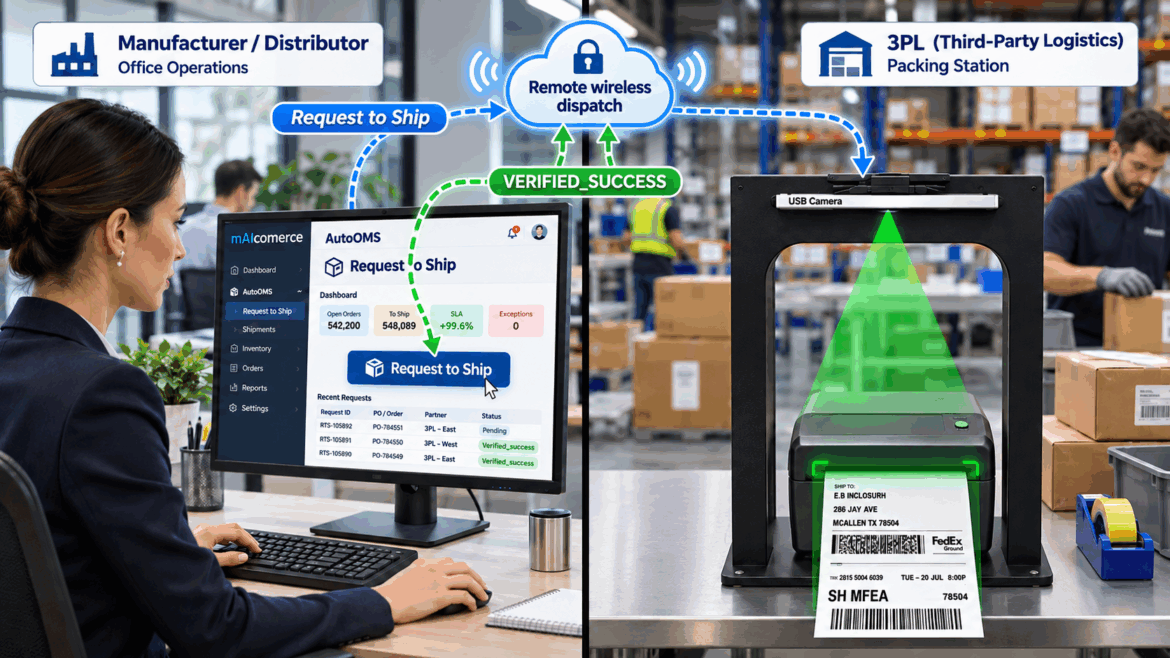
When a manufacturer or distributor requests a 3PL or remote distributor warehouse to ship an order, software alone only tells you a label file was generated. Our camera-enabled AI printer inspects the physical label as it prints, reads live printer telemetry via AutoOMS, and reports the exact label print status back to the requester in real time.
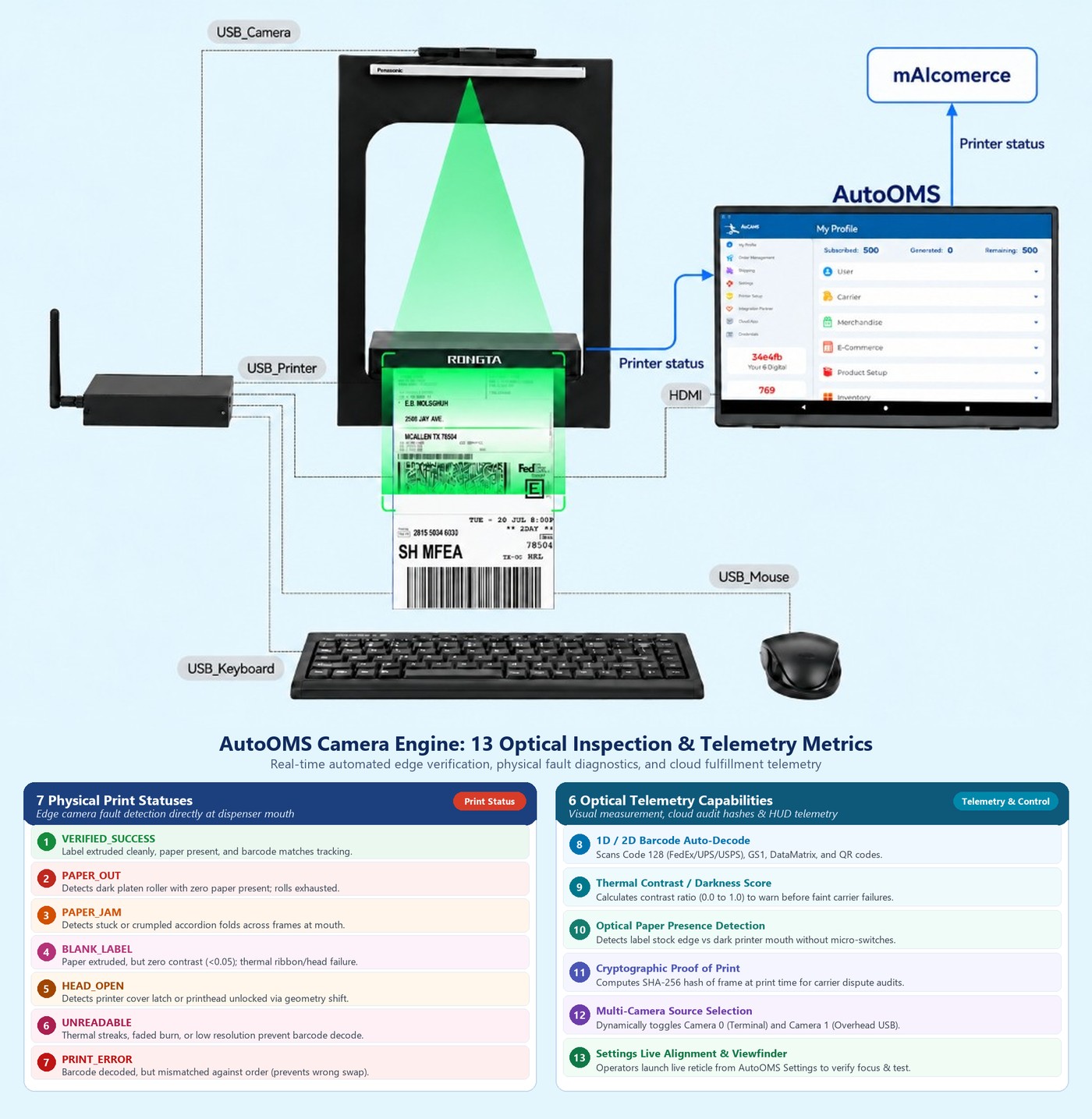
The Camera-Enabled AI Printer Station: Overhead optical verification + AutoOMS hardware telemetry + mAIcomerce partner feedback.
Manufacturer / Distributor
Sends ship & label request via mAIcomerce to 3PL or partner distributor warehouse.
3PL / Distributor Floor
AutoOMS receives job at the assigned packing station and drives the thermal label printer.
Optical + Device Scan
Overhead camera decodes 1D/2D barcodes & contrast while AutoOMS checks paper & head.
Verified or Held
Reports VERIFIED_SUCCESS or exact fault (Jam / Out / Blank) back to requester.
Manufacturer & Distributor request 3PL or Distributor to ship.
In distributed fulfillment, the team creating the shipment request is miles away from the warehouse floor where the box gets packed and labeled.
Manufacturer → 3PL or Regional Distributor
A manufacturer releases factory-direct or wholesale allocation orders from headquarters in mAIcomerce, sending the request-to-print directly to the 3PL or distributor warehouse holding the stock.
Master Distributor → Partner Warehouse or 3PL
A distributor routes drop-ship or replenishment shipments to a partner warehouse or contract 3PL station with the carrier service, ship-from policy, and label format pre-selected.
Zero Blind Handoffs
Instead of hoping a remote warehouse printed the label cleanly, the requester stays connected to the physical print event from the moment the request is sent.
Direct-to-3PL & Distributor Dispatch
Release orders from headquarters while contract-packers, regional distributors, and 3PL floors print locally with full visual verification returned to your team.
Multi-Warehouse Fulfillment Control
Route customer orders to the closest distributor branch or 3PL partner and know immediately whether the shipping label printed cleanly at that bench.
Verified-Label Fulfillment Proof
Give every brand and distributor client cryptographic and optical proof that their shipping label was printed, scanned, and verified before carrier pickup.
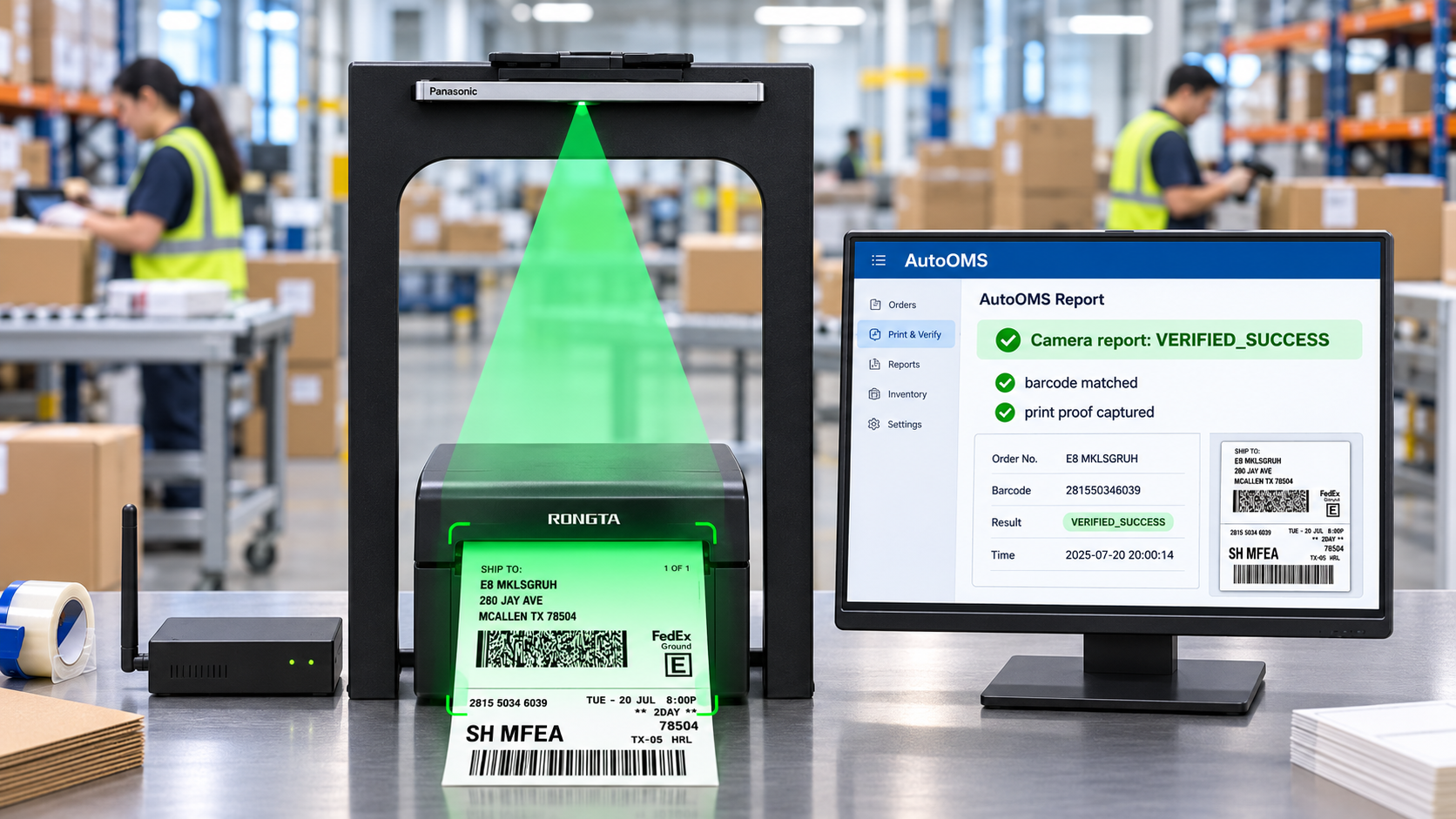
The warehouse receives the print job at the active packing bench.
When the request to ship arrives at the 3PL or distributor warehouse, AutoOMS routes the label directly to the designated packing station printer.
Instant Station Routing via AutoOMS
No downloading PDFs or selecting the wrong printer tray. AutoOMS binds the order to the specific warehouse packing bench and thermal label printer.
Live Hardware Telemetry Before & During Print
AutoOMS monitors USB printer state in real time — checking media presence, printhead latch status, ribbon/thermal readiness, and job queue completion.
Catching Exceptions at the Bench, Not the Dock
If a roll runs out mid-batch or a label jams in the dispenser mouth, the station alerts the packer immediately and holds the shipment until a verified reprint succeeds.
The camera-enabled AI printer inspects every label and tells the exact print status.
A printer driver can only say data was sent. The overhead AI camera mounted above the printer looks at the physical label exiting the dispenser mouth and combines optical computer vision with hardware sensor telemetry.
Real-time edge computer vision + SHA-256 proof at the printer
What is the label print status? Every print returns a clear verdict.
Whether the shipment was requested by a manufacturer or a distributor, both the local warehouse bench and the remote requester see the exact same label print status in real time.
Label Verified & Matched
Label extruded cleanly, paper present, and decoded tracking barcode matches the requested order.
Audit Frame Captured
Timestamped optical confirmation and SHA-256 frame hash recorded for the manufacturer, distributor, and 3PL.
Roll Exhausted
Camera and sensor detect dark platen roller with zero paper present; roll is exhausted and print job is held.
Printhead Unlatched
Detects printer cover latch open or printhead unlocked via geometry shift; prompts local staff to latch cover.
Accordion Fold / Stuck
Detects stuck or crumpled accordion folds across frames at the printer mouth; halts queue to clear media.
Zero Thermal Contrast
Paper extruded, but contrast score (<0.05) shows thermal ribbon/head failure or backwards media roll.
Faint / Streaked Barcode
Thermal streaks, faded burn, or low resolution prevent barcode decode; flags immediate reprint at bench.
Wrong Order / Mismatch
Barcode decoded, but tracking number mismatches the active order — prevents wrong-box cross-labeling.
| Camera-Enabled Printer Status | What the Camera & Printer Detect | Warehouse Station Action | Manufacturer / Distributor Update |
|---|---|---|---|
| VERIFIED_SUCCESS | Clean label, high contrast, barcode matches order | Apply label & release parcel to carrier | Marked Print Verified with proof timestamp |
| PAPER_OUT / HEAD_OPEN | Empty media roll or unlatched printhead cover | Pause queue, reload roll / close latch, auto-resume | Notified of station media hold until reprinted |
| PAPER_JAM / BLANK_LABEL | Jammed label at mouth or blank thermal output | Stop print job, clear jam/ribbon, trigger reprint | Exception logged; prevents unshipped “ghost” tracking |
| UNREADABLE / PRINT_ERROR | Damaged barcode or wrong label for active order | Block handoff & reprint verified replacement | Protected from carrier chargeback or mis-shipment |
One camera-enabled printer. One warehouse bench. Complete shipment proof.
Connect your manufacturer or distributor ship requests in mAIcomerce to a camera-enabled AI printer station at your 3PL or warehouse floor.