
Frequently Asked Questions
AirPrinter FAQ
Why purchase the AirPrinter?
- Order Automation Aggregating Process
- Invoice Generating
- Shipping Label Generation
- Tracker Number Notifications
What does it do?
With integrated automation, the AirPrinter allows businesses to modify and facilitate their manual work like fetching orders from eCommerce stores and other marketplaces, creating invoices, generating labels, sending tracking numbers to customers, and inventory updates with the help of automation.
Will this increase my business’s efficiency?
Receiving more orders and managing them manually can be more time-consuming resulting in hiring additional employees and managing the long workaround. It helps with the following:
- Time efficiency and better work engagement.
- Automated shipping and label generation.
- Zero error in the work.
- Best order management system for stores.
- Takes less space and saves money
How can AirPrinter make my customer’s order process easier?
Are you looking for a way to make your ordering process simpler? Do you run your business on Etsy, eBay, Amazon, Shopify, or some other relevant e-commerce platforms? Stop searching and buy our AirPrinter right away!
How many orders can the AirPrinter process?
The AirPrinter can handle between 30 to 100 orders efficiently, significantly reducing the time required for manual processing.
What are the key benefits of using the AirPrinter?
- Error Free Workflow: Eliminates human errors in order management.
- Space and Cost Savings: Reduces the need for additional manpower and workspace.
- Automation Features: Includes automated shipping, label generation, and order tracking notifications.
- Time Efficiency: Processes orders faster and more accurately.
Can the AirPrinter integrate with ERP and accounting systems?
Yes, the AirPrinter seamlessly integrates with ERP systems and accounting software, enabling automated data entry and invoice generation.
How does the AirPrinter help reduce costs?
By automating manual tasks like order fetching, label printing, and tracking number notifications, the AirPrinter minimizes the need for additional employees and reduces time spent on repetitive tasks.
Does the AirPrinter support RMA (Return Merchandise Authorization)?
Yes, the AirPrinter provides RMA support, helping you manage returns seamlessly and saving you additional manpower.
Does the AirPrinter require a computer to operate?
No, the AirPrinter is an all-in-one printer that operates without requiring a PC.
Who should use the AirPrinter?
Businesses that manage multiple orders daily on e-commerce platforms and want to increase efficiency, reduce errors, and streamline their order processing will greatly benefit from the AirPrinter.
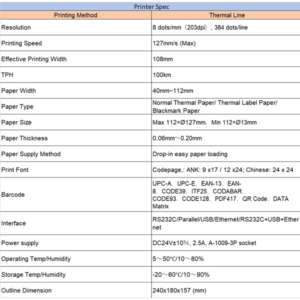
What are the specifications?
We’ve crafted a special chart carefully that demonstrates the ramifications of our AirPrinter. Kindly take a look at the chart below…