

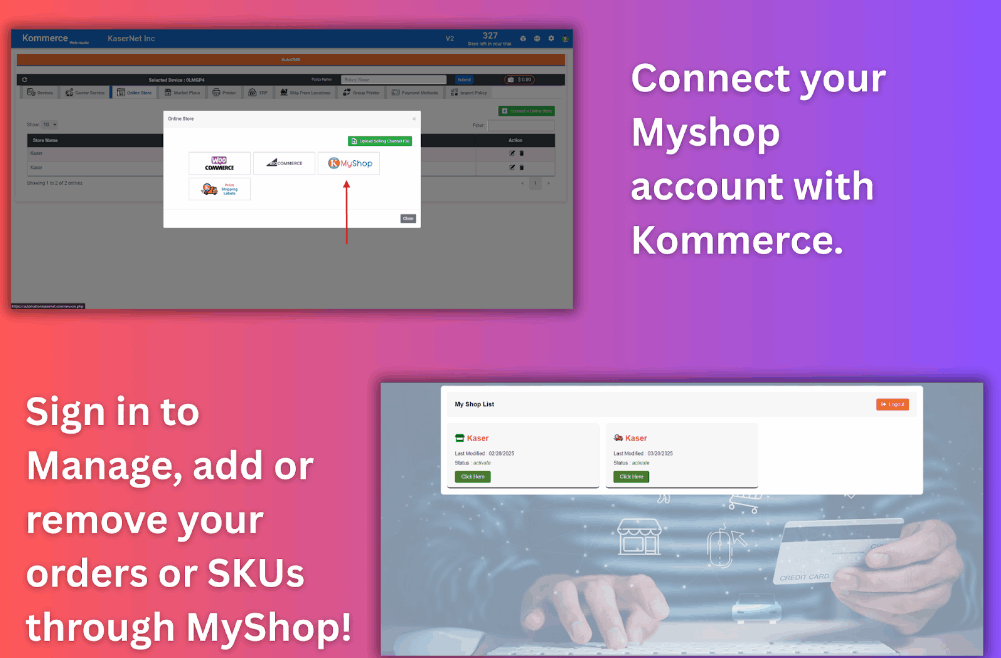
Managing internal, phone, or bulk partner orders shouldn’t be complicated and with MyShop by mAIcomerce, it isn’t. Whether you’re receiving spreadsheet orders from corporate buyers, email orders from distributors, or direct files from your global partners, MyShop makes it easy to centralize and automate order processing.
In this quick tutorial, we’ll walk you through how to import your orders into MyShop using Kasernet’s smart ecommerce ecosystem.
🛠 Step-by-Step: How to Import Orders into MyShop
Step 1: Visit kasernet.com
Head over to kasernet.com and click “MyShop” in the top navigation bar.
Step 2: Navigate to the Order Upload Section
On the MyShop landing page, you’ll see various tools and options — find and click the “Order Upload” button. This will take you to MyShop’s official dashboard.
Step 3: Create an Account or Sign In
If you’re a new user, create an account. Existing users can sign in using their Gmail and alias.
💡 Tip: Not sure what your alias is?
Go to the automation portal, click on your username, and you’ll see your alias listed next to your account. Copy that alias and use it to log into MyShop.
Step 4: Import Your Order
Once signed in:
Select your store from the dropdown
Click “Import Order”
A file explorer will appear — select the order file you want to upload
Click upload — your order is now imported into MyShop!
Note: If an order already exists, you’ll see a duplicate error. Simply adjust the order number or skip duplicates.
🎯 Why Use MyShop?
Unlike standard ecommerce platforms, MyShop is designed for real-world manufacturer workflows:
Import bulk orders from email or spreadsheets
Manage phone and partner orders with precision
Syncs with ERP and shipping for full automation
Supports RMA, sample orders, and internal fulfillment
Whether you’re fulfilling orders for Lenovo, Dell, or a private label client — MyShop gives your operations the flexibility and structure they need.
Need Help?
The mAIcomerce support team is always ready to assist if you have questions about logins, file formats, or automation workflows.
Want to automate even more?
Visit kasernet.com to learn how MyShop, AutoOMS, Kommerce, and AirPrinter come together to power truly autonomous order fulfillment.
🚀 Ready to Get Started?
Skip the clunky spreadsheets and overkill software.
With Kommerce, fulfillment is finally simple, smart, and scalable.
👉 Learn more at Kasernet.com
📧 Or reach out for a free demo: sales@kasernet.com
No fluff. No overwhelm. Just fulfillment that works.